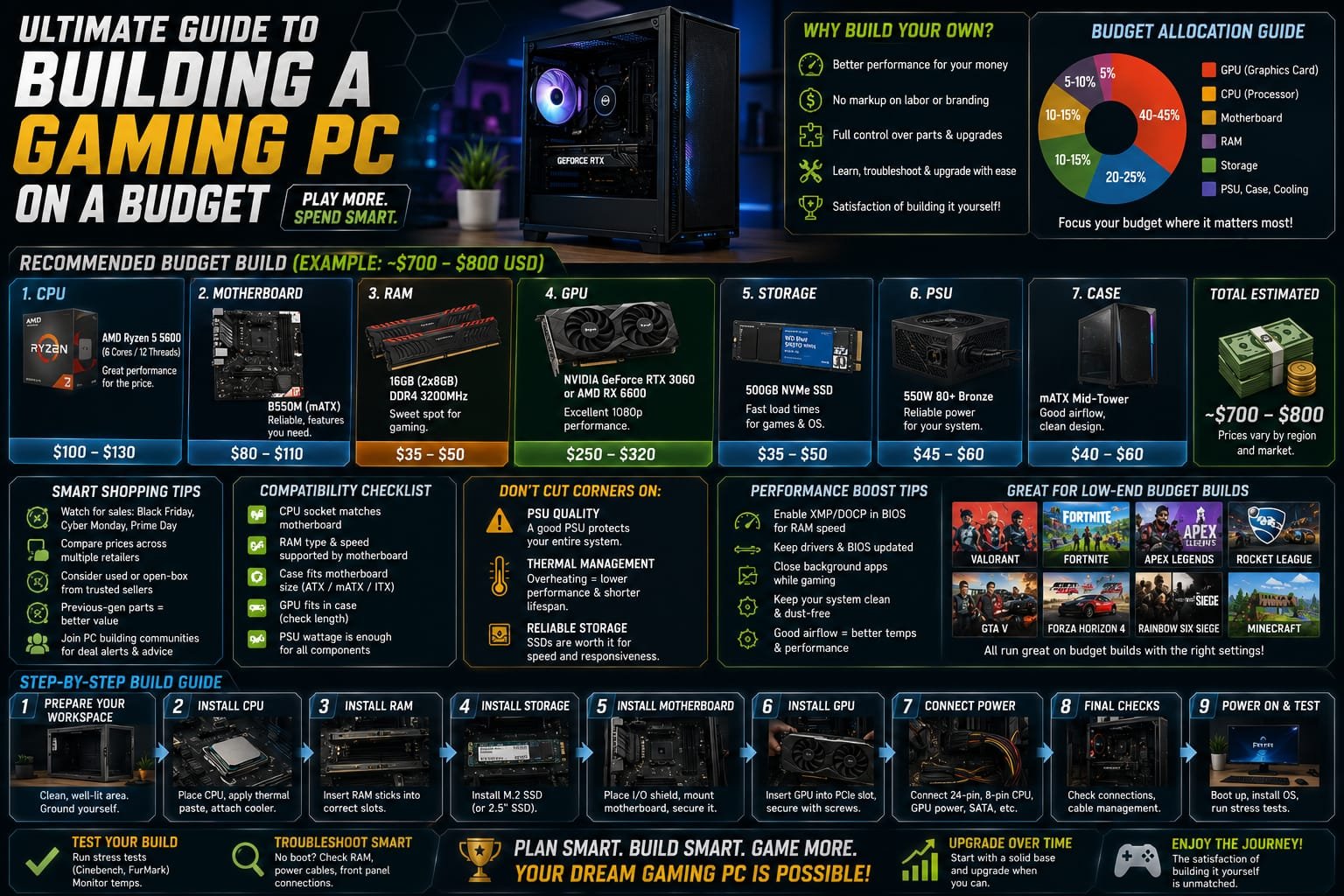
Building your own gaming PC has long been considered a rite of passage for serious gamers, but the perception that it requires a massive budget often discourages people from even attempting it. The reality is that with careful planning and smart component selection, it’s entirely possible to build a capable gaming PC without spending a fortune.
This guide walks through the entire process of building a budget gaming PC, from understanding essential components to making smart purchasing decisions that maximize performance per dollar spent.
Why Build Instead of Buy Pre-Built?
Pre-built gaming PCs offer convenience, but they often come with a markup for assembly and branding that eats into your budget. Building your own PC allows you to allocate your entire budget directly toward components that actually matter for gaming performance, rather than paying for labor and brand premiums.
Additionally, building your own system provides valuable knowledge about how your PC works, making future troubleshooting, upgrades, and repairs significantly easier and less intimidating compared to relying entirely on a manufacturer for support.
Setting a Realistic Budget
Before purchasing any components, it’s important to establish a clear budget and understand how it should be allocated. Generally, the graphics card should receive the largest portion of your budget for gaming-focused builds, since it has the most direct impact on gaming performance, particularly frame rates and visual quality.
The processor should receive the next significant portion, followed by RAM, storage, and then the remaining components like the motherboard, power supply, and case. Avoiding overspending on components that won’t meaningfully impact gaming performance, such as excessive RGB lighting or premium cases with minimal functional benefit, helps stretch a limited budget further.
Choosing the Right Processor
The processor, or CPU, handles the overall computational tasks of your system and works alongside the graphics card to determine gaming performance. For budget builds, mid-range processors from recent generations often provide excellent value, delivering strong gaming performance without the premium price tag of flagship models.
It’s worth researching which processor generation offers the best price-to-performance ratio at the time of your build, since pricing and value shift frequently as newer generations release and older models see price reductions.
Selecting a Graphics Card
The graphics card is typically the most important component for gaming performance and often takes up the largest portion of a gaming PC budget. When shopping for a budget-friendly graphics card, focus on models that offer strong performance in the resolution and frame rate you’re targeting, rather than chasing the newest release for its own sake.
Previous-generation graphics cards, once new models are released, often see significant price drops while still offering strong performance for the vast majority of games. This makes them excellent value options for budget-conscious builders willing to forgo the absolute latest technology.
RAM: Finding the Sweet Spot
Sufficient RAM ensures smooth multitasking and prevents performance bottlenecks during gaming, especially with modern titles that have increasingly demanding memory requirements. For most budget gaming builds, a moderate amount of RAM strikes the right balance between cost and performance.
Overspending on excessive RAM capacity beyond what current games realistically utilize is a common mistake among budget builders. Researching the recommended RAM specifications for the games you plan to play most frequently helps avoid unnecessary spending in this area.
Storage: SSD vs HDD Considerations
Storage choice significantly impacts not just game loading times but overall system responsiveness. Solid state drives offer dramatically faster load times compared to traditional hard drives, making them the preferred choice for the operating system and frequently played games.
For budget builds, a smaller solid state drive for the operating system and priority games, combined with a larger traditional hard drive for additional storage, often provides the best balance between performance and cost per gigabyte.
Motherboard Selection
The motherboard doesn’t directly impact gaming performance the way the CPU and GPU do, but it needs to be compatible with your chosen processor and provide adequate features for your build. For budget builds, choosing a motherboard with just enough features to support your components, without paying for unnecessary premium features like extensive overclocking support, helps keep costs controlled.
Ensuring compatibility between your motherboard, processor socket type, and RAM specifications is crucial before finalizing your component list, as mismatched components can render your entire build non-functional.
Power Supply: Don’t Cut Corners Here
While it might be tempting to save money on the power supply unit, this is one component where cutting corners can be genuinely risky. A low-quality or underpowered power supply can lead to system instability, component damage, or even safety hazards in extreme cases.
Choosing a reputable power supply brand with sufficient wattage for your specific component combination, along with appropriate safety certifications, is an investment in the longevity and reliability of your entire build, even on a tight budget.
Case Selection for Budget Builds
The case houses all your components and affects airflow, which in turn impacts thermal performance and component longevity. For budget builds, a simple case with adequate airflow and enough space for your chosen components is generally sufficient, without needing to spend extra on aesthetic features that don’t impact actual performance.
Checking that your chosen case supports the size of your motherboard, graphics card length, and cooling solution before purchasing prevents compatibility issues that could derail your build.
Cooling Considerations
Adequate cooling prevents thermal throttling, which can significantly reduce gaming performance during extended sessions. Many budget processors come with adequate stock coolers that handle standard workloads reasonably well, potentially eliminating the need for an aftermarket cooling solution in basic budget builds.
For builds with slightly higher-performance components or for those planning any level of overclocking, investing in a modest aftermarket cooler can provide meaningfully better thermal performance without a significant budget increase.
Where to Find the Best Deals
Timing your purchases around sales events, checking multiple retailers for price comparisons, and considering certified refurbished or open-box components from reputable sellers can all help stretch a limited budget further. Patience often pays off significantly when building a budget PC, as component prices fluctuate regularly.
Joining online communities focused on PC building can also provide valuable insight into current deals, common pitfalls to avoid, and real-world performance expectations for specific budget-friendly component combinations.
Assembly Tips for First-Time Builders
For those building a PC for the first time, following a structured assembly guide step by step, rather than rushing through the process, helps avoid costly mistakes. Taking time to properly seat components, manage cable routing for good airflow, and double-check all connections before powering on the system for the first time prevents most common build issues.
Numerous detailed video tutorials and written guides are available online, walking through each step of the assembly process in detail, making it accessible even for complete beginners with no prior building experience.
Testing and Troubleshooting Your New Build
After assembly, thoroughly testing your new PC before considering the build complete is essential. Running stress tests on both the CPU and GPU helps identify any stability issues early, while monitoring temperatures during these tests ensures your cooling solution is adequate for your components.
If you encounter issues during initial boot-up, methodically checking connections, ensuring RAM is properly seated, and verifying compatibility between components often resolves the vast majority of common build problems.
Final Thoughts
Building a budget gaming PC is entirely achievable with careful planning, research, and smart component prioritization. By focusing your budget on components that most directly impact gaming performance, particularly the graphics card and processor, while avoiding unnecessary spending on components with minimal performance impact, you can build a genuinely capable gaming system without an enormous financial investment.
The knowledge gained through the building process itself also provides long-term value, making future upgrades and troubleshooting far less intimidating, and setting a solid foundation for a gaming setup that can grow and evolve alongside your gaming interests and budget over time.
About the Author