Few things frustrate gamers more than experiencing lag or high ping during an intense match, especially when it results in missed shots, delayed reactions, or unfair deaths that feel entirely out of your control. Understanding what causes these issues and knowing practical solutions can dramatically improve your online gaming experience.
This guide breaks down the common causes of lag and ping problems, along with actionable troubleshooting steps to help minimize these frustrating issues and get you back to smooth, competitive gameplay.
Understanding the Difference Between Lag and Ping
Before troubleshooting, it helps to understand what these terms actually mean. Ping refers to the time it takes for data to travel from your device to the game server and back, measured in milliseconds. Lower ping means faster communication between your device and the server, resulting in more responsive gameplay.
Lag, on the other hand, is the broader term for any noticeable delay or stutter in gameplay, which can be caused by high ping, but also by other factors like insufficient hardware performance, network congestion, or server-side issues unrelated to your personal connection.
Checking Your Internet Connection Speed
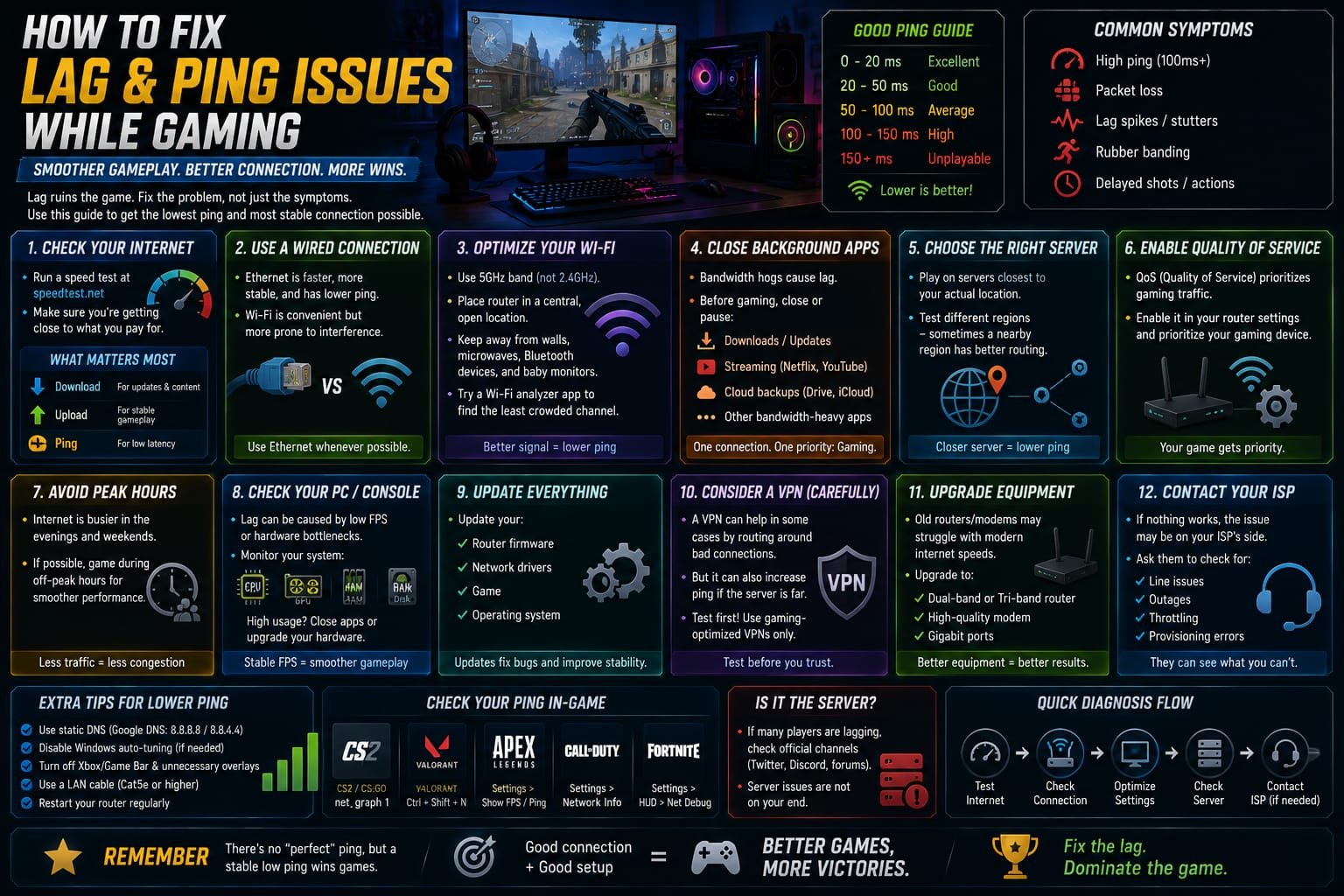
The first step in diagnosing lag issues is verifying your actual internet speed matches what you’re paying for. Running a speed test provides a baseline understanding of your download and upload speeds, which directly impacts how quickly data can be transmitted between your device and game servers.
If your measured speeds are significantly lower than what your internet plan promises, contacting your internet service provider to investigate potential issues with your connection or equipment is a reasonable next step before assuming the problem lies elsewhere.
Wired Connection vs Wireless
While Wi-Fi offers convenience, it’s generally less stable and more prone to interference compared to a wired ethernet connection. Physical obstacles, distance from your router, and interference from other wireless devices can all contribute to inconsistent ping and occasional connection drops during gameplay.
Switching to a wired ethernet connection, when possible, often provides a noticeably more stable and lower-latency connection, making it one of the most effective and straightforward solutions for reducing lag during competitive online gaming sessions.
Router Placement and Configuration
For gamers who must rely on Wi-Fi, optimizing router placement can significantly improve connection stability. Positioning your router in a central, elevated location, away from physical obstructions and electronic devices that cause interference, helps maximize signal strength throughout your gaming space.
Additionally, ensuring your router’s firmware is updated and configuring quality of service settings, which prioritize gaming traffic over other network activity, can help maintain more consistent ping during gaming sessions, even when other devices are using the same network.
Closing Background Applications and Downloads
Other applications and devices using your network connection simultaneously can significantly impact your available bandwidth during gaming sessions. Streaming services, large file downloads, or cloud backup processes running in the background all compete for the same limited bandwidth, potentially causing noticeable lag spikes.
Pausing unnecessary downloads and closing bandwidth-intensive applications before starting a gaming session helps ensure your available bandwidth is dedicated primarily to maintaining a stable, low-latency connection to the game server.
Choosing the Right Server Region
Many online games allow players to select or are automatically matched with specific server regions. Choosing a server geographically closer to your actual location generally results in lower ping, since data has less physical distance to travel between your device and the server.
If a game offers manual server selection, experimenting with different regional servers, even ones slightly farther from your exact location, can sometimes yield surprisingly better ping results depending on the underlying network infrastructure and routing between your location and each specific server.
Understanding Network Congestion
Network congestion occurs when too much data traffic attempts to pass through the same network infrastructure simultaneously, causing delays similar to traffic congestion on a busy road. This can happen at various points between your device and the game server, sometimes entirely outside your control.
Gaming during peak usage hours, when internet service providers experience higher overall network traffic in your area, can result in increased congestion-related lag. If possible, gaming during off-peak hours may provide a noticeably smoother experience, particularly for competitive matches where consistent performance matters most.
Hardware Considerations Beyond Network Issues
Sometimes what feels like lag is actually related to hardware performance rather than network connectivity. Insufficient RAM, an overloaded processor, or a struggling graphics card can all cause stuttering or delayed input response that feels similar to network lag but stems from entirely different causes.
Monitoring your system’s hardware performance during gameplay, using built-in or third-party monitoring tools, can help identify whether hardware limitations are contributing to your gameplay issues alongside or instead of actual network-related problems.
VPN Services: Helpful or Harmful?
While VPNs are sometimes marketed as tools to reduce gaming lag by optimizing network routing, their effectiveness varies significantly depending on your specific network situation and geographic location. In some cases, a VPN can actually increase latency by adding an additional routing step between your device and the game server.
If considering a VPN specifically for gaming purposes, researching services that specifically advertise gaming-optimized routing, and testing actual ping improvements before committing to a subscription, helps avoid potentially making your connection worse rather than better.
Router and Modem Age Considerations
Older routers and modems may struggle to handle modern internet speeds and multiple connected devices efficiently, even if your internet plan itself offers sufficient bandwidth. Outdated equipment can become a bottleneck, causing inconsistent performance regardless of your actual internet service quality.
If your networking equipment is several years old, particularly if you’ve upgraded your internet plan since purchasing it, investing in updated equipment capable of handling higher speeds and more simultaneous connections can meaningfully improve overall network performance during gaming.
Contacting Your Internet Service Provider
If you’ve tried multiple troubleshooting steps without meaningful improvement, contacting your internet service provider directly is a worthwhile next step. They can check for area-wide outages, verify your connection is performing as expected on their end, and potentially identify issues with your specific line or equipment that aren’t visible from your side.
In some cases, providers can also offer guidance on optimal router settings or recommend equipment upgrades specifically suited to your internet plan and typical usage patterns, including gaming-specific considerations.
When the Issue Is Server-Side
Sometimes lag issues aren’t related to your connection at all, but rather to problems with the game’s servers themselves. This can happen during high-traffic periods, such as major game launches or popular in-game events, when server infrastructure becomes overwhelmed by unusually high player volume.
Checking official game social media accounts or community forums for reports of server issues can help determine whether widespread problems are affecting many players simultaneously, which would indicate the issue lies with the game’s infrastructure rather than your personal connection.
Final Thoughts
Lag and ping issues can stem from numerous different sources, ranging from your home network setup to broader server infrastructure problems outside your control. Systematically working through potential causes, starting with the most common and easily fixable issues like connection type and background bandwidth usage, before moving to more advanced troubleshooting steps, provides the most efficient path toward resolving frustrating gameplay interruptions.
While not every lag issue can be completely eliminated, particularly those related to server-side problems or significant geographic distance from available servers, understanding these underlying causes empowers gamers to address the factors genuinely within their control, leading to a noticeably smoother and more enjoyable online gaming experience overall.
About the Author